Rubrics, Classroom Tools, and Organizing
Today I’m using Codex as part of my course-prep process for J329, but what I really wanted to explore was how AI can support the less visible (boring) parts of creative teaching: structuring assignments, clarifying expectations, and building tools that make classroom activities easier to run.
First up were rubrics. I started with Blackboard’s built-in AI rubric generator, but the results felt uneven. Some pieces were useful, but the rubrics did not feel like they belonged to the same course. They were all over the place, and because you can’t generate with much specificity, the results were based on luck. It was definitely a “well that looks good enough” result. But again, they did not feel consistent across the whole class.
Using Codex instead, I created a more consistent structure across the assignments: the same grading categories, the same performance levels, and language that better matched the goals of the class. I organized the rubrics as local files on my computer, and Codex was able to look at them all at once, analyze them, and suggest not only unifying language, but options I had not considered. It worked pretty well.
A useful distinction emerged around grading process-based work. For this course, I do not want students graded primarily on polish or technical perfection. I want them graded primarily on whether they made intentional choices, used the tools with some control, and reflected thoughtfully on what happened. Judging this is not my strong suit, and this led to a new rubric scale that feels more aligned with a short, one-credit creative AI course where exploration matters.
The second part of the work turned into a small classroom tool. Several assignments use Mad Lib-style prompts to promote controlled randomness in assignments, and in the past I handled that by cutting up paper slips and having students draw the variables from a bowl. That has a nice tactile energy, but with a larger class it becomes harder to manage.
Codex helped me turn that activity into a simple local web app: students’ names are loaded from a roster, assignment variables come from a separate editable data file, and the tool generates combinations in a way that still preserves some of the live reveal feeling of the original activity.
What worked well was the speed of moving from a teaching problem to a usable classroom object. I was able to describe the activity in plain language, test the result, and revise it based on how it would actually feel in class.
What did not work automatically was judgment. I still had to decide when the language sounded right, when the interface felt too cluttered, and when the tool was drifting away from the classroom experience I wanted to preserve.
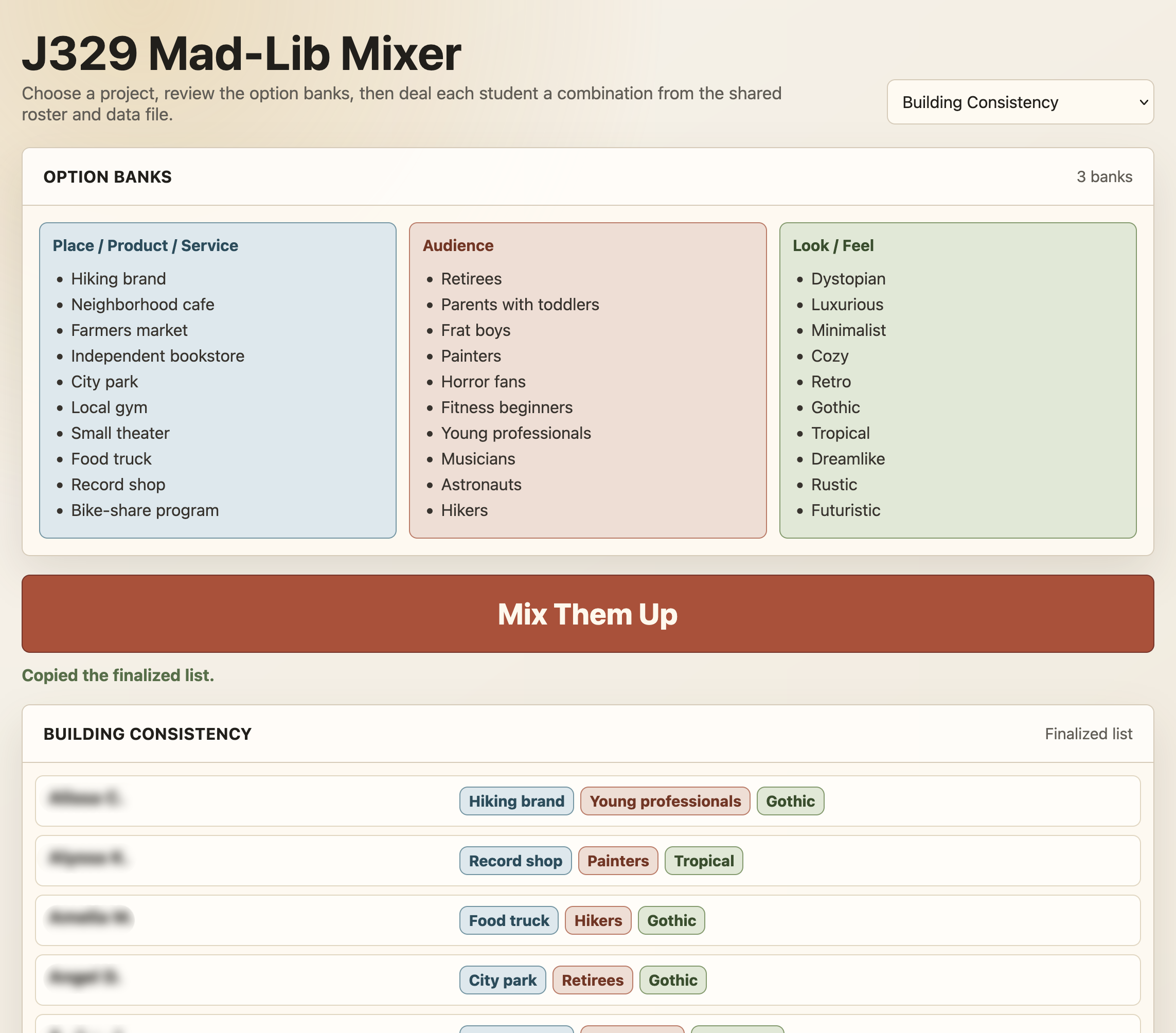
Here’s the best part: the whole process took 23 minutes from start to finish.
Here is my initial prompt to get it started:
All right. So, I want to make a tool for this activity. Because I would normally have the students come up and pick these topics out of a bowl, there's a fun tactile vibe for the class of like, oh my gosh, I'm choosing my Mad Lib. And I'd like to create a digital version of that. Now, what I'm envisioning is a small web app that has a page that lists all of the Mad Libs in columns, so the students can just see them and be like, "okay." And then a button that says something along the lines of, you know, "mix them up." And when I hit that button, it lists out, line by line, the student's name and their Mad Libs just in a row so they can see it building, and then we'll have a finalized list. Can you make that?

Also, it sounds like we're making this as a one-off hard-coded thing, I would love to be able to update an external document that then drives all the stuff that's in the HTML, so I can use this every semester.
This is what’s exciting me about AI right now: tiny, personalized software anyone can create for their specific needs. The freedom to create personalized tools in under an hour is fantastic.