Big Question; Can AI Grade for Me?
One of my goals for this fellowship is to turn both classes I am teaching this semester over to AI and see what happens. By that, I mean working through every part of teaching and finding out where AI can actually help. I have already used it to plan assignments, develop activities, build classroom tools, and think through what I am trying to teach. I am still responsible for the classes and every decision that comes out of this experiment. I just want to keep testing the boundaries of what the tool can functionally do.
But grading is the big one.
Can this thing functionally grade for me?
Before I get too far into this, I should disclose something. My students do not currently know that I am using AI as part of the grading process. I am going to tell them at the end of the semester, and I want to talk with them about how they feel before and after they know. I have done versions of that conversation in my AI classes at the end of previous semesters, and the context always matters. Students may be comfortable with AI being involved in the grading for an AI class and deeply uncomfortable with the exact same process in another class.
That is a larger conversation I want to return to after I have actually gathered their reactions. Right now, I am still gathering data.
I also want to be clear about what I mean when I say AI graded these assignments. I personally read every student’s work, every score, and every piece of feedback before anything was posted. I changed scores. I rewrote feedback. I corrected the AI when it misunderstood the assignment or missed something in the work. Nothing went directly from the model into the gradebook without me looking at it.
So yes, I used AI to grade… with the same amount of freedom I’d allow a crappy TA.
The Shift Change
I was grading two assignments at roughly the same time. One was a Moodboard assignment for my UI/UX class. The other was an assignment about promtping styles called ‘Everyday Favorites’ for my generative AI class.
I ended up using two different AI models for two different parts of the process. I used Sol, the higher-reasoning and more expensive model, to help me plan the grading. We talked through the assignments, what I was actually trying to teach, what counted as success, how I usually score the work, and what I wanted the student feedback to sound like.
Then I used Luna, the faster and less expensive model, to do the more mechanical work of grading the class.
The handoff between them happened through a structured Markdown file. Sol wrote down the assignment requirements, the rubric, the scoring rules, the calibration decisions, the feedback voice, and the weird little boundaries that would be easy to lose in a chat. Then it wrote a handoff message for Luna explaining what to read and what to do.
It felt like one worker ending a shift and meeting the next worker at the door. Here is what happened today. Here is what still needs to happen. Here are the things you need to watch for. Here is where the boss gets picky.
I had never tried that before. I had always thought about switching models mostly in terms of which one was better for a whole process. This made me think about them as being better suited to different kinds of labor. I needed the expensive reasoning while I was trying to articulate my teaching judgment. I didn’t necessarily need that same level of reasoning to open files, follow an established structure, apply repeated criteria, and build a grading ledger. This was functionally done by switching the model in the same chat once it was ready to move from reasoning to grading. The Markdown file was necessary because there’s memory loss when models switch in the same chat session.
And because AI can multitask, the two assignments were moving at the same time. While one model was working through a grading pass, I could be set up or review the other process.
The Complicated One
The Moodboard assignment was the complicated case. It is a two-page project for my UI/UX class, a required course with 39 visual communication majors. They are mostly third-year students, with some fourth-years mixed in, so everyone comes into the room with a shared foundation in design.
For the assignment, students create a highly specific concept for a very simple app, define an unusually narrow audience, write audience-specific microcopy, and build a visual direction with imagery, typography, and a usable color palette.
There are a lot of moving parts in those two pages.
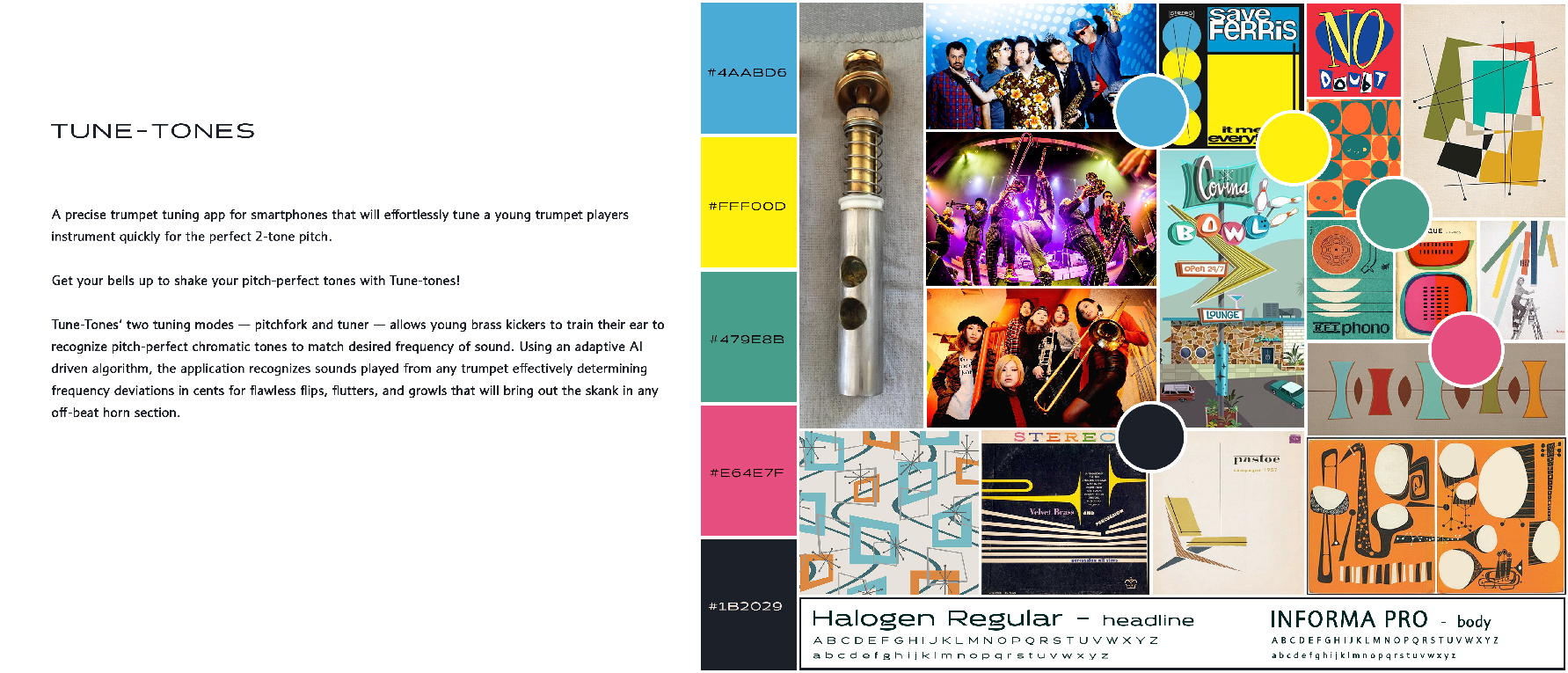
The setup took time because I couldn’t just simply hand the AI the assignment sheet, snap by fingers and walk away. I had to explain what the assignment was really doing. A visually attractive moodboard was not enough. The app needed one restrained function. The audience needed to be specific enough to shape the design. The language needed to sound like it belonged to that audience. The images needed to communicate more than a general vibe.
I also had to stop the AI from grading too early. It wanted to turn the information I was giving it into a rubric and get started before I had finished explaining what I meant. I had to keep saying, essentially, we are still planning. Do not grade anything yet. AI is an eager beaver for sure.
Once the plan was established, the grading model inventoried the submissions, checked the files, extracted text where it could, rendered the pages, created grayscale versions of the color palettes, applied the rubric, drafted short feedback, and assembled everything into a Markdown file for me to review.
This is where the gaps appeared.
The AI said it had checked color-value contrast, a true measurement of contrast that compares levels of black in each color, but it missed a lot of it. For example, red and green are highly contasting colors but look identical when comparing their value. The very first palette had this combination and AI didn’t flag it so I knew it was somethig I would have to check manually. I’m not sure why it wasn’t able to do this, because I know it can view images in grayscale, but I suspect it was because I asked it to do all the processes at the same time instead of defining individual steps into a skill for it to execute.
The AI could also identify a coherent aesthetic, but it didn’t always ask where the user was. A moodboard full of food, instruments, or pretty textures may communicate the subject without showing who uses the app, where they use it, how that experience feels, or what the eventual interface might become.
It sometimes confused an audience problem with a microcopy problem. A student might already have a narrow audience, but the language choices didn’t actually speak to that audience. The AI’s first response was often to tell the student to narrow the audience further, which was fixing the wrong thing.
It also treated the one-function rule too mechanically. Some filters and warnings were not separate features. They were supporting actions inside the main task. That distinction made perfect sense to me when I saw it, but I had not fully explained it in the written criteria.
My solution was to add “Jason’s Notes” for each student directly into the Markdown file I was reviewing. I corrected the interpretation, adjusted scores and feedback, and then had the AI reread my decisions and recalibrate the rest of the grading.
That part was not especially frustrating. The disagreement became part of the process. Each correction gave the AI a clearer picture of what I meant, and it gave me a clearer picture of the things I had assumed were obvious.
The assignment had been demonstrated in class through lecture and group practice. We had talked about where the user appears in a moodboard, what microcopy is doing, and how a palette needs to function. But those ideas had not all made their way into the rubric. The AI could not know what I meant simply because I remembered teaching it.
The AI could not know what I meant simply because I remembered teaching it.
By the time I finished reviewing, correcting, and posting everything, the Moodboard grading took roughly twice as long as it normally would have.
That is not the dazzling efficiency story someone would put in an AI product demo.
It was also the first time I had built this particular grading process. The instructions now exist. The rubric decisions exist. The model has examples of where I corrected it. When I teach the assignment again, I won’t be starting from an empty chat and trying to explain my standards from scratch.
At least, that is the theory. We will find out next semester!
The Faster One
Everyday Favorites went much more smoothly.
This class is a very different mix. It is a one-credit generative AI elective with no prerequisites and 24 students from across the university. There are visual communication, advertising, sports media, mass communication, broadcast journalism, political science, information science, film and media studies, sports and entertainment management, marketing, and undeclared students in the same room. This is the first time I’ve’ taught it with students from outside our college, so they don’t all begin with the same creative or technical background.
Everyday Favorites is an assignment where students compare narrative and semantic approaches to prompting. They explore a place and a thing, generate images using both approaches, and reflect on how the structure of the prompt changed what the model produced.
It is a process assignment. I am not grading whether the final image is the most beautiful or creative. I am looking for whether the student actually explored the two approaches, whether the images show that exploration, and whether the reflection demonstrates that they noticed what happened.
This assignment has always taken me less than an hour to grade. It is fairly straightforward. With AI, I finished the entire process in about 45 minutes.
My first reaction was: not too shabby.

Actually, this worked great.
The setup was faster because the assignment had a simpler grading structure and the overall workflow was now established. I understood how to separate planning from grading, how to write the durable instructions, how to hand the work from Sol to Luna, and how I wanted the final Markup file organized.
The first pass looked almost perfect. The feedback was specific. The scores generally made sense. The AI could compare the written prompts with the generated images and read the students’ reflections. It also surfaced class-wide patterns: students saw models inventing signs and brand names, misspelling text, changing backgrounds, ignoring spatial instructions, and polishing ordinary places into something closer to stock photography. Several students began combining narrative and semantic prompting on their own when they wanted the feeling of one and the control of the other - a conclusion this assignment pushed them towards figuring out on their own. Success, right?
Then I noticed a problem.
The AI had been too generous. Some students labeled a prompt as semantic even though it was still another narrative paragraph. The prompt may have been more descriptive, but it did not use the field-based, checklist-like structure we had labelled as semantic and practiced in class.
The AI saw the heading that said semantic. It saw effort, multiple images, and a thoughtful reflection. It rewarded the complete-looking assignment without consistently asking whether the central distinction had actually happened.
This was not entirely the model’s fault. We had demonstrated the difference in class, but the written grading instructions needed a harder rule: a longer descriptive paragraph is still a narrative prompt. The structure has to change to be semantic.
I corrected the affected scores, added feedback explaining the distinction, and updated the grading instructions so the next pass would classify the prompt by its actual structure instead of trusting the student’s label.
That correction also created a wonderfully ordinary bookkeeping problem. When I manually changed component scores, the old totals and performance labels no longer matched. The AI had validated the arithmetic before my edits, but no one had told it to run the validation again afterward.
So now the process needs another rule: every human correction should trigger another arithmetic check.
Very futuristic stuff.
What I Got Besides Grades
The class-wide analysis may be the most useful part of this process.
I normally encounter assignments one student at a time. I notice patterns, of course, but AI gave me a quick way to collect them across the class and ask what kept happening.
In the Moodboard assignment, students were generally better at creating a visual atmosphere than they were at defining a specific audience, limiting the app to one function, or writing language connected to that audience. Many palettes had different colors without enough light-to-dark contrast to function in an interface. Some moodboards showed the subject repeatedly but never showed the user or the experience.
In Everyday Favorites, students generally understood that narrative prompting dealt more easily with memory, mood, and atmosphere, while semantic prompting offered more control over observable details. The assignment also revealed that some students didn’t understand the structural difference between the two, while several others were already combining the approaches when they wanted the feeling of one and the control of the other.
Those patterns give me something concrete to act on. I can revise the assignments, add clearer examples, build checkpoints, and decide where the next class needs more time. That does not mean every recurring problem is automatically my fault. Students miss class. They ignore instructions. They submit AI-generated writing without taking the time to edit it back to the requested scope. They’rre adults, and they’ve got to have some responsibility for their own learning.
But the collection still tells me where the holes are. If something mattered enough for me to grade and enough for me to correct the AI about, it probably needs to exist somewhere more durable than my memory of a classroom demonstration.
So, Did It Grade for Me?
I think the honest answer is yes…maybe? The clear split and definition of grading became more complicated as soon as I tried it.
The AI did a great deal of the work. It opened and organized the submissions, created review files, applied repeated criteria, drafted feedback, maintained the record, and found patterns across the class. On the more structured assignment, it handled the whole process within an already short grading window and still gave me the class-wide synthesis. On the more subjective visual assignment, the first attempt took considerably longer than grading it myself.
Like I mentioned at the beginning, I still read every submission. I still approved every score. I still read and edited every student’s feedback before posting it. I still made the decisions when the work fell into the fuzzy space between rubric categories or when the AI interpreted a rule differently than I did.
I don’t know yet which of those pieces I’ll always want to keep. I’ll figure it out at some point, bug for now I’m comfortable trying the new tech.
So, two assignments down. A whole bunch more to test as the semesters slogs on.